Due Mon, Nov 16: June 30 year ends, and calendar years on extension.Due Monday, November 16: returns for tax years ending June 30, and calendar-year returns extended with Form 8868. Other year ends
E-file your Form 990-EZ for $39.99
Upload your PDF or fill it in on the site. We check it against the IRS e-file rules, and once an officer signs, we send it to the IRS.
Form 990-EZ
Short Form Return of Organization Exempt From Income Tax · Tax year 2025
Filing fee
- The fee covers Form 990-EZ, any of Schedules A, B, C, E, G, L, N and O that apply, and the supporting statements, with no extra charge per schedule.
No card or account needed to start. Fill in the form online, then create a free account to save it and file. Have your organization's completed PDF? Create a free account to upload it.
Authorized IRS e-file Provider
Fast File Exempt LLC, Sacramento, California.
Starting the return is free. You pay only to file it.
If the IRS rejects the return, you can correct it and resubmit it at no extra charge.
Questions? Email support@fast-file-exempt.com.
- Right form? Form 990-EZ is for gross receipts under $200,000 and year-end assets under $500,000. Private foundations file Form 990-PF, and some organizations must file Form 990 whatever their size.
- This is for returns prepared by your organization's own officers, employees or volunteers. We don't file returns completed by a paid preparer.
See the due dates for every tax year end.
Not ready to file yet?
Get one email a week before Form 990-EZ is due. No account needed.
How filing a Form 990-EZ works
These are screens from the app, filled in with a made-up example. We've left the fees out of them. You'll find the current fee above and at checkout.
Step 1
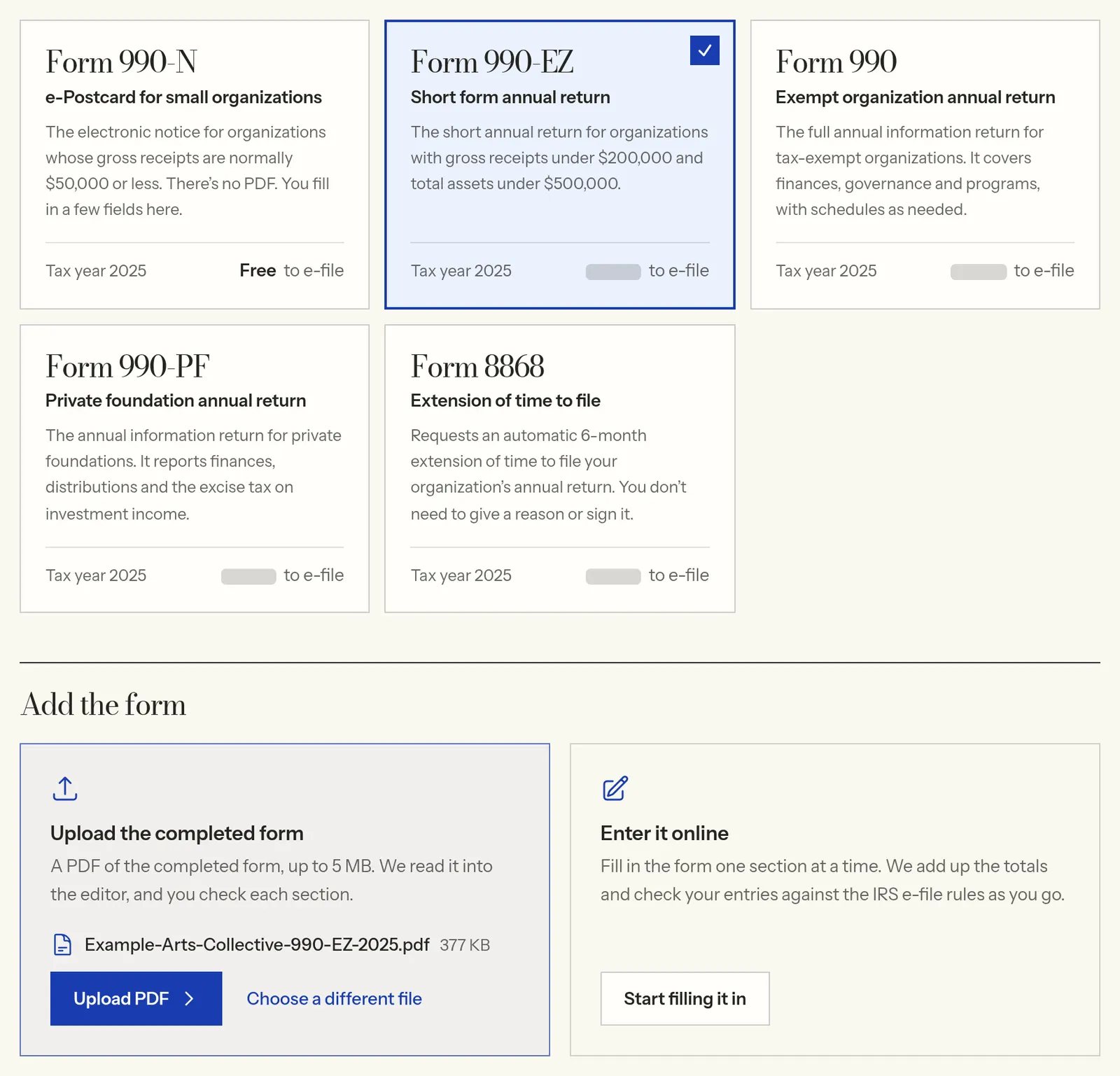
Upload the PDF, or enter it online
Choose Form 990-EZ, then upload the PDF of the return your organization prepared. You can enter the figures online instead. If you enter it online, you can start from last year's return once the IRS has published it, wherever you filed it.
View full size Step 2
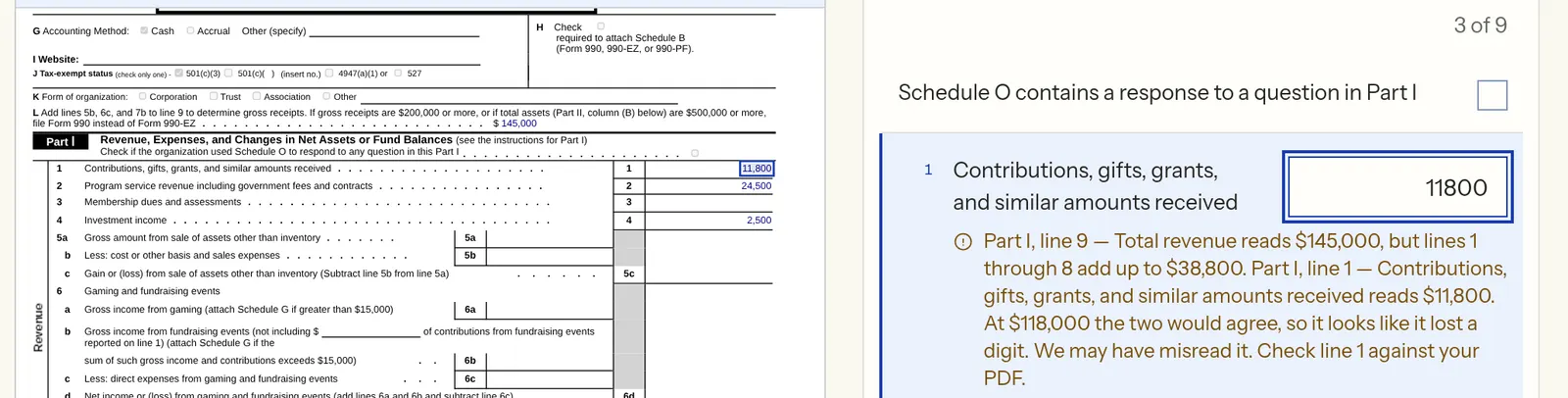
Check the entries beside the IRS form
We read your PDF into our editor and show your entries beside the IRS form. If a figure looks misread, the editor names the line to check and the amount it would need to be, and highlights that line on the form.
View full size Step 3
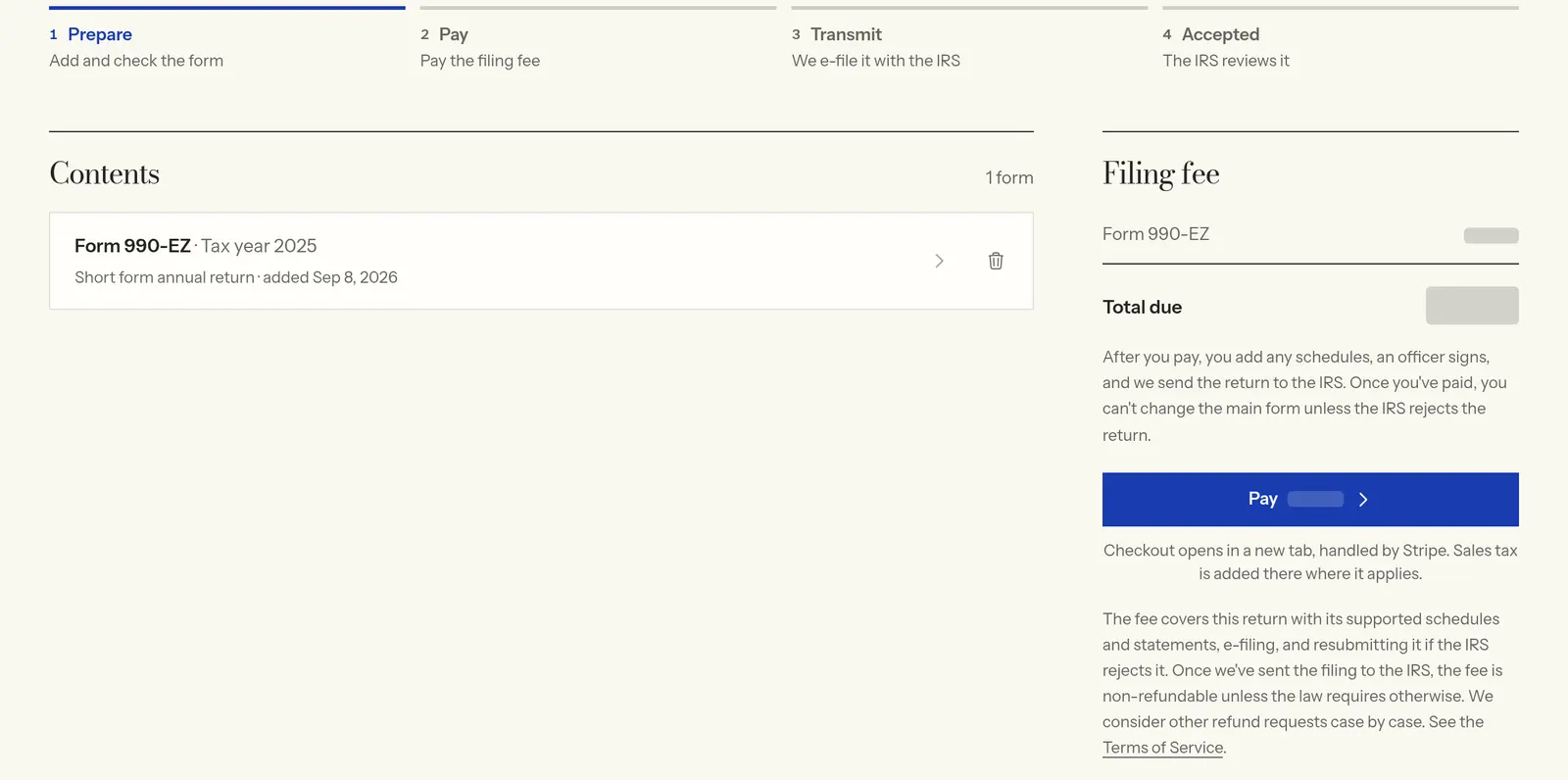
Pay the filing fee
Starting the return is free. When the main form is ready, pay once to go on to the schedules, the supporting statements and signing. You can still change the main form after you pay, until an officer signs.
View full size Step 4
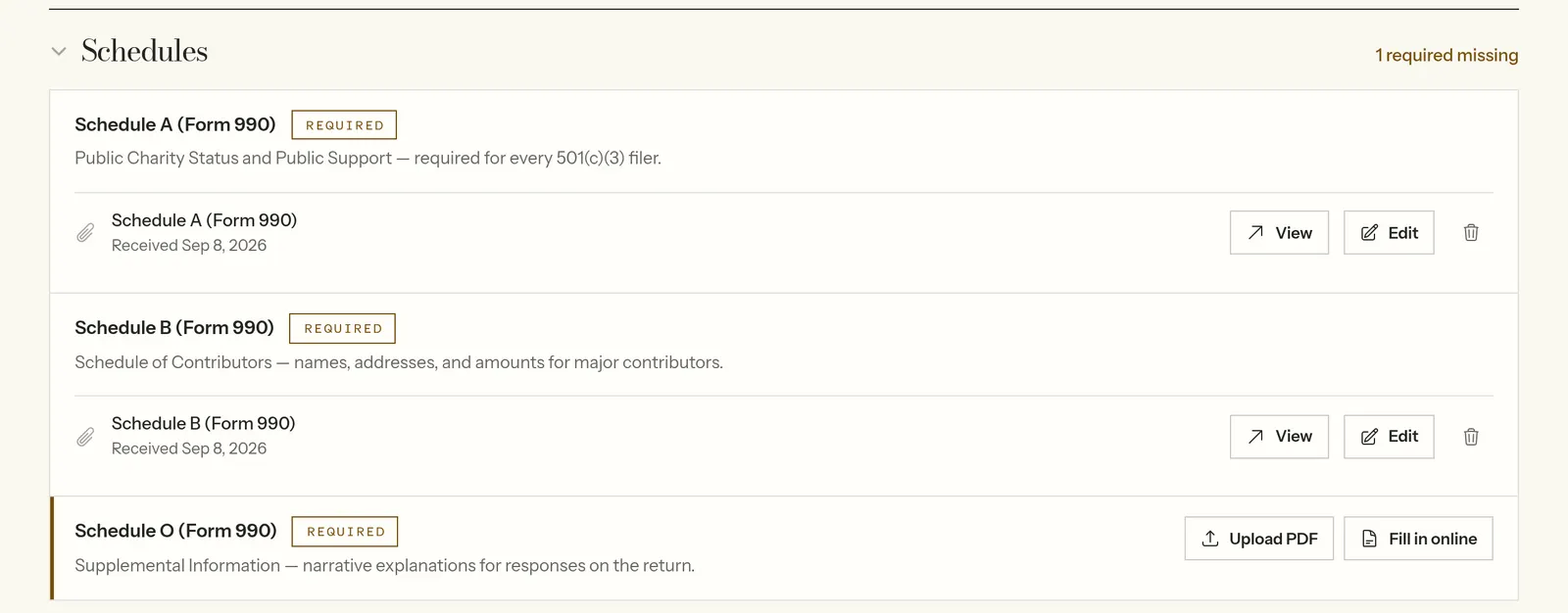
Add the schedules
Upload or fill in each schedule your return calls for, such as Schedules A, B and O. The page shows which ones are still missing.
View full size Step 5
An officer signs, and we e-file it
Look over the complete return, then have an officer sign it. We send it to the IRS and email you their acknowledgement.
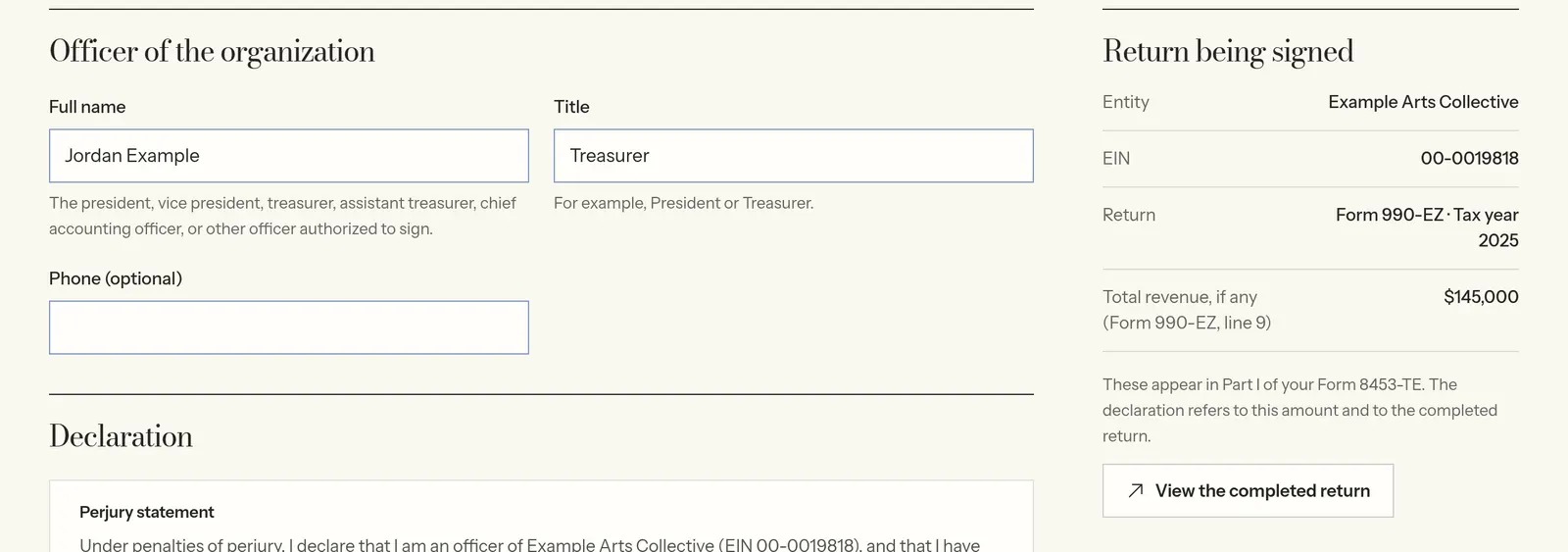
View full size
Starting the return is free. Filing fee: $39.99
What to have ready
Before you start, check the figures on the return. You'll also need:
- Your completed Form 990-EZ as a PDF (up to 5 MB), or its figures to enter online
- The organization's EIN and the tax year the return covers
- The schedules that apply, such as Schedule A for a public charity
- The supporting statements the return refers to
What the fee covers
We file the tax year 2025 Form 990-EZ with any of Schedules A, B, C, E, G, L, N and O that apply, and the supporting statements. The return's filing fee covers the supported schedules.
Check both eligibility limits
An organization can generally use Form 990-EZ if its gross receipts are under $200,000 and its year-end assets are under $500,000. It has to meet both limits, and some organizations have special filing rules. Smaller organizations may be able to file Form 990-N instead. Private foundations generally file Form 990-PF.
Source: IRS Instructions for Form 990-EZ · IRS: which forms exempt organizations file
Check the return before an officer signs
Check the revenue, expenses, balance sheet, program-service information and the schedules that apply. Correct any entries that are wrong.
Starting the return is free. You pay once when you're ready to add the schedules, sign and file. You can still change the main form after you pay, until an officer signs. Before signing, look over the complete return, schedules and statements included.
When an officer signs, we send the return to the IRS and email you their acknowledgement. The IRS decides whether to accept it, and passing our automated checks doesn't mean they will. If they reject it, correct the return and resubmit it at no extra charge.
Questions
Can I file an amended Form 990-EZ?
Yes, once the IRS has accepted the return you're amending, whether you filed it here or somewhere else. It costs the same as the original. Upload or enter the whole corrected return, not just the changes, with its Amended return box checked, and describe the changes on Schedule O. If you filed the original here, choose File an amended return when you start the form, and we'll check the box for you.
Is Schedule A a separate charge?
No. The filing fee covers the supported schedules your Form 990-EZ needs, Schedule A included. Include the schedules that apply to your organization.
Can I start from last year's Form 990-EZ?
Yes, wherever you filed it, once the IRS has published it. Enter the form online and we start from that return: the one you filed here, or, for a return filed somewhere else, the copy the IRS publishes. We fill in your organization's name and address, mission, programs and officers, last year's year-end balances as this year's beginning balances, your answers to the yes/no questions, and Schedule A's support history. Each entry is marked for you to check, and this year's amounts start blank. The IRS publishes returns some months after they're filed, so a recent one may not be there yet.
Is Form 990-EZ automatically the right choice for a small nonprofit?
No. Check both financial limits and the IRS special filing rules. Some organizations must file Form 990. Smaller organizations may be able to file Form 990-N, and a small private foundation generally files Form 990-PF.
When is Form 990-EZ due?
Generally on the 15th day of the 5th month after the tax year ends. If that date falls on a weekend or legal holiday, it moves to the next business day. Form 8868 can extend the time to file, but not the time to pay any tax due. If you file the extension here and pay for the Form 990-EZ at the same time, the extension is free.
Read next
- Form 990-N, 990-EZ or 990: which to fileThe three tests, what "normally $50,000" means, who must file Form 990 regardless, and who doesn't file at all.
- Starting from last year's returnWhat comes across from last year's Form 990, 990-EZ or 990-PF, and what you still enter.
- Schedule A: public charity statusWho attaches Schedule A, the 33⅓% and 10% public support tests over five years, the 2% limit and the first five years.
- Schedule B: listing contributorsThe $5,000 rule, the 2% special rule for public charities, the no-Schedule-B box, and which donor details are public.
- Form 990 filing deadlinesThe general due date for each tax-year end, and how weekends and holidays move it.
- Who can file Form 990-NThe "normally $50,000 or less" test, what the e-Postcard asks for, and when it's due.
- Filing feesWhat each form costs here and what the fee includes.
- Filing with an AI assistantHow to enter a prepared return with an AI assistant, and the steps a person has to take.
File your Form 990-EZ
No card or account needed to start. Fill in the form online, then create a free account to save it and file. Have your organization's completed PDF? Create a free account to upload it.